Callouts: Main board ANOVA_PRO_MAIN_V2.0 - LED / touch-key side
Source: FCC ID 2APBOAN600, internal-photos exhibit 3999178 (2018 sample), page 3, top photo (720x537)
Annotated image: images/annotated/main_led-side.png
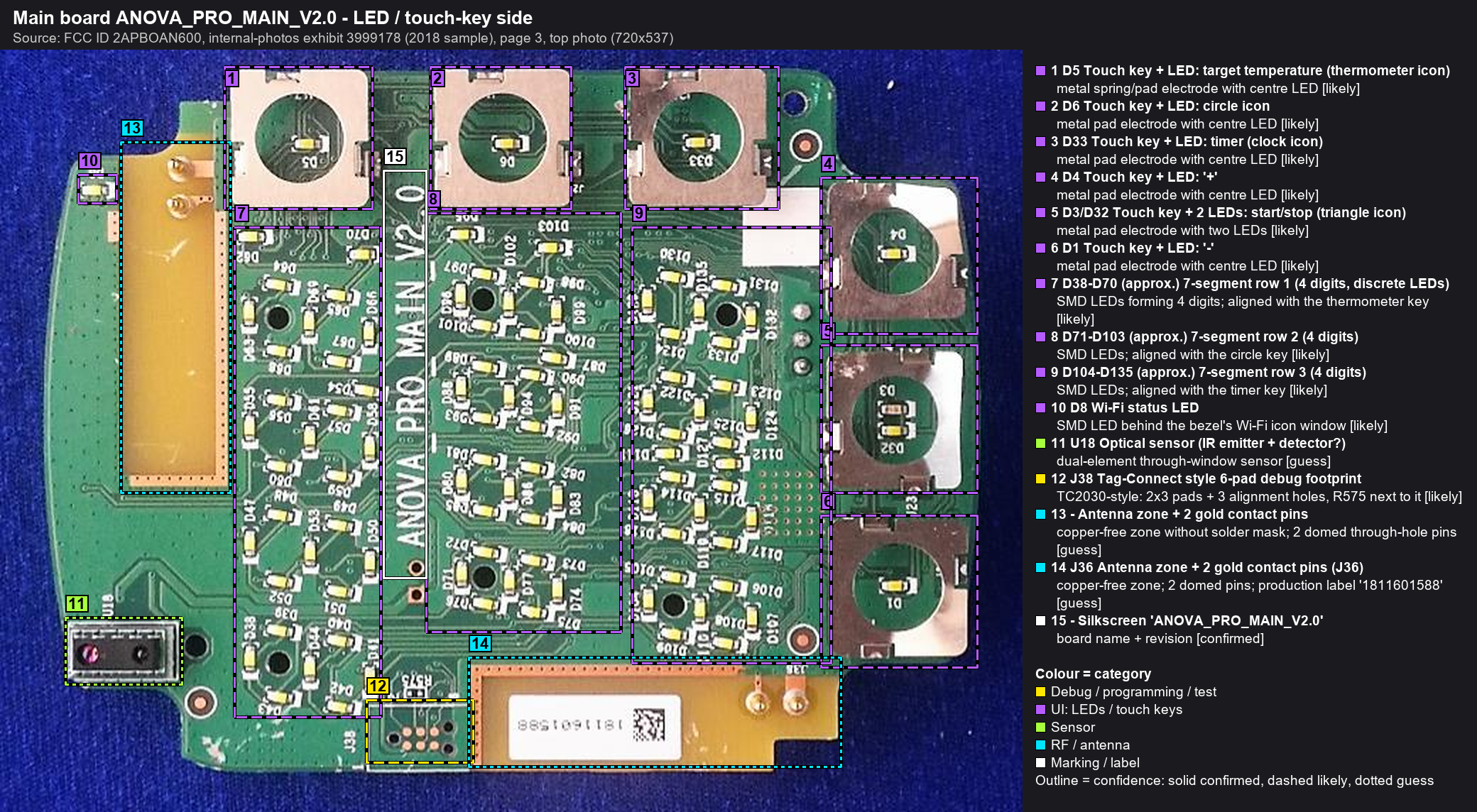
| # | Ref | Identification | Part / marking | Category | Confidence | Notes |
|---|---|---|---|---|---|---|
| 1 | D5 | Touch key + LED: target temperature (thermometer icon) | metal spring/pad electrode with centre LED | UI: LEDs / touch keys | likely | Key-to-icon mapping derived by overlaying this board on the bezel photo (front_bezel). Verify on the device. |
| 2 | D6 | Touch key + LED: circle icon | metal pad electrode with centre LED | UI: LEDs / touch keys | likely | Circle icon on the bezel, function unconfirmed. The manual lists Current temp, Target temp, Timer, Start/Stop, +, -. |
| 3 | D33 | Touch key + LED: timer (clock icon) | metal pad electrode with centre LED | UI: LEDs / touch keys | likely | |
| 4 | D4 | Touch key + LED: '+' | metal pad electrode with centre LED | UI: LEDs / touch keys | likely | + and - are symmetric icons, so which end is which comes from the mirror geometry only. |
| 5 | D3/D32 | Touch key + 2 LEDs: start/stop (triangle icon) | metal pad electrode with two LEDs | UI: LEDs / touch keys | likely | The bezel back shows a left-pointing triangle, which is a right-pointing 'play' triangle from the front. |
| 6 | D1 | Touch key + LED: '-' | metal pad electrode with centre LED | UI: LEDs / touch keys | likely | |
| 7 | D38-D70 (approx.) | 7-segment row 1 (4 digits, discrete LEDs) | SMD LEDs forming 4 digits; aligned with the thermometer key | UI: LEDs / touch keys | likely | Each segment is lit by discrete SMD LEDs behind the bezel light guide. Row order follows the bezel overlay. Refdes ranges are approximate. |
| 8 | D71-D103 (approx.) | 7-segment row 2 (4 digits) | SMD LEDs; aligned with the circle key | UI: LEDs / touch keys | likely | |
| 9 | D104-D135 (approx.) | 7-segment row 3 (4 digits) | SMD LEDs; aligned with the timer key | UI: LEDs / touch keys | likely | |
| 10 | D8 | Wi-Fi status LED | SMD LED behind the bezel's Wi-Fi icon window | UI: LEDs / touch keys | likely | |
| 11 | U18 | Optical sensor (IR emitter + detector?) | dual-element through-window sensor | Sensor | guess | Sits behind the rectangular bezel window. Likely proximity (wake on approach) or ambient-light sensing. |
| 12 | J38 | Tag-Connect style 6-pad debug footprint | TC2030-style: 2x3 pads + 3 alignment holes, R575 next to it | Debug / programming / test | likely | Back-to-back with J37 on the component side. Two footprints suggest one per MCU (CC3220S / CC2640R2F). Verify by continuity. |
| 13 | Antenna zone + 2 gold contact pins | copper-free zone without solder mask; 2 domed through-hole pins | RF / antenna | guess | The gold pins probably contact the black strip with a gold pad on the bezel (antenna element feed/ground?). | |
| 14 | J36 | Antenna zone + 2 gold contact pins (J36) | copper-free zone; 2 domed pins; production label '1811601588' | RF / antenna | guess | Same pattern as #13, mates with the second black strip on the bezel. The label likely encodes the 2018 week-11 build date (unverified). |
| 15 | Silkscreen 'ANOVA_PRO_MAIN_V2.0' | board name + revision | Marking / label | confirmed |